
Four Seasons Transition Image Generator - Create Seamless Seasonal Art with AI
Generate stunning four seasons transition images with AI. Seamlessly blend Winter, Spring, Summer, and Autumn into one unified masterpiece. Create mesmerizing seasonal panoramas in seconds. Try now!

场景:悉尼大剧院----超写实数字插画风格
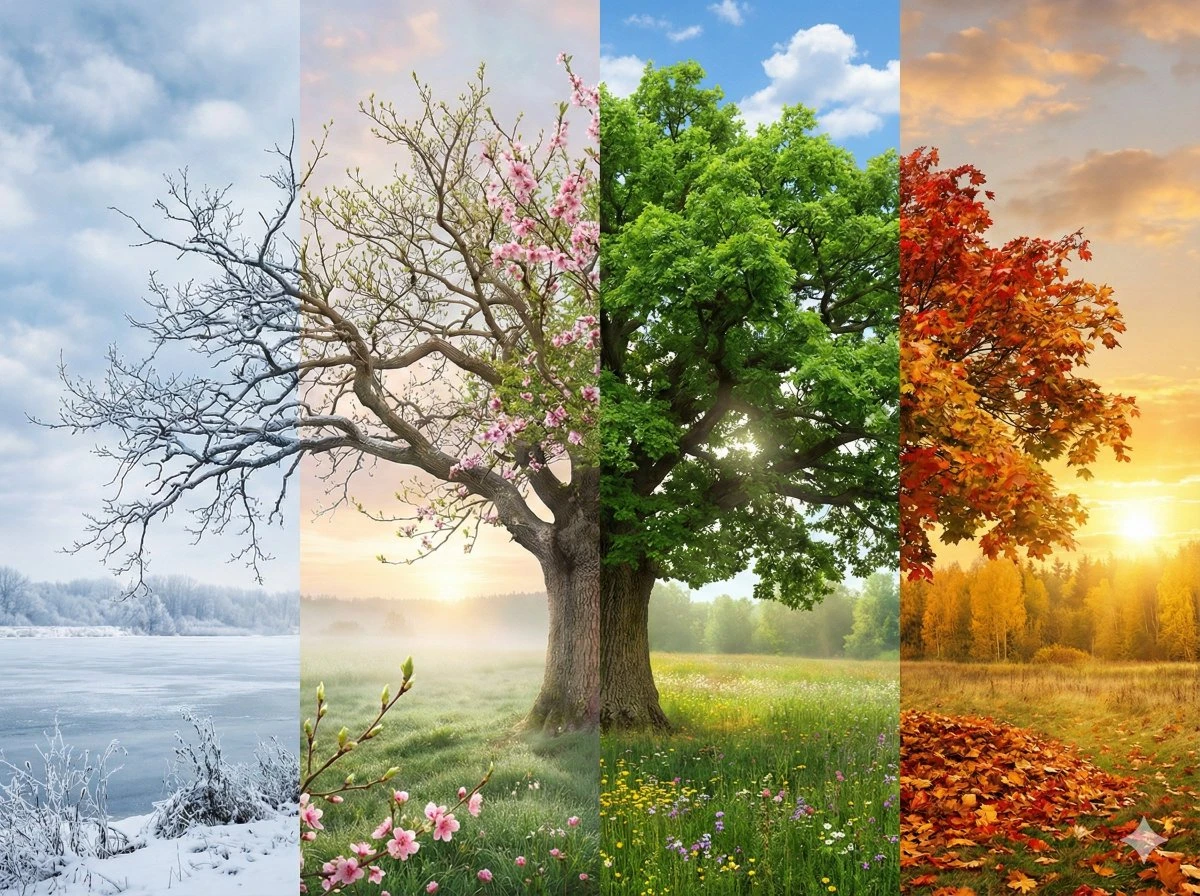
超写实数字插画风格,以【场景】为主题,呈现四季流转于同一幅完整画面之中。从画面左至右,自然过渡地依次展现冬、春、夏、秋四季变迁: 画面最左侧为冬季,呈现寒冷、冰雪覆盖的景象;逐渐向右过渡,冰雪融化,万物初醒,新芽萌发,春意盎然;继续推进,植被变得浓郁茂盛,阳光炽烈明媚,夏季盛景跃然纸上;最后,场景平缓地过渡至右侧的秋季,树叶逐渐转为金黄、橙红,体现出秋日的丰富色彩与氛围。 画面整体无明显分界线,各季节间的气候、光影和植被状态自然融合,过渡流畅,构成一幅充满时间流动感和象征意义的统一画面。细节丰富逼真,电影级质感光影表现,8K超高清解析度,纹理细腻精致,画面比例为4:3。
 宝玉
宝玉
You can copy and paste any of these directly in...
You can copy and paste any of these directly into the {Scene} placeholder in the previous prompt. U
宝玉
🍌 nano banana prompt Create a mesmerizing pas...
Hyper-realistic digital illustration of {Scene}, presented as a single continuous composition showcasing the cycle of seasons. The scene flows seamlessly from left to right in a natural progression: Winter, Spring, Summer, and Autumn. The left side features cold snowy winter elements, gradually thawing into the fresh green buds and blooms of spring, then morphing into the lush vibrant vegetation and bright sunlight of summer, and finally transitioning into the golden, orange, and red hues of autumn on the far right. There are no visible dividing lines between seasons; the weather, lighting, and vegetation blend smoothly to create a unified and harmonious panorama. Rich in detail, symbolic of the passage of time, cinematic lighting, 8k resolution, highly detailed textures. --ar 4:3
宝玉1. What is Four Seasons Transition Image Generation?
- 🎨 Seamless Season Blending: No visible divisions between seasons, natural gradual transitions
- ❄️🌸☀️🍁 Complete Seasonal Cycle: From Winter's snow to Autumn's gold in one image
- 🏞️ Universal Scene Support: Apply to landscapes, cityscapes, landmarks, nature scenes
- 🎬 Cinematic Quality: Hyper-realistic rendering with 8K resolution support
- ⏱️ Time Passage Symbolism: Visual metaphor for the flow of time and life cycles
- 🆓 Free Generation: Create stunning seasonal transition art at no cost
2. How to Use Four Seasons Transition Generator?
- 🌳 Natural Landscapes: Trees, mountains, valleys, forests, lakes
- 🏙️ Urban Scenes: City streets, landmarks, waterfronts, parks
- 🏛️ Historic Sites: Monuments, bridges, famous buildings
- 🏡 Personal Spaces: Gardens, courtyards, neighborhood streets
- 🌄 Scenic Vistas: Panoramic views, horizons, pathways
- "A majestic oak tree in an open meadow"
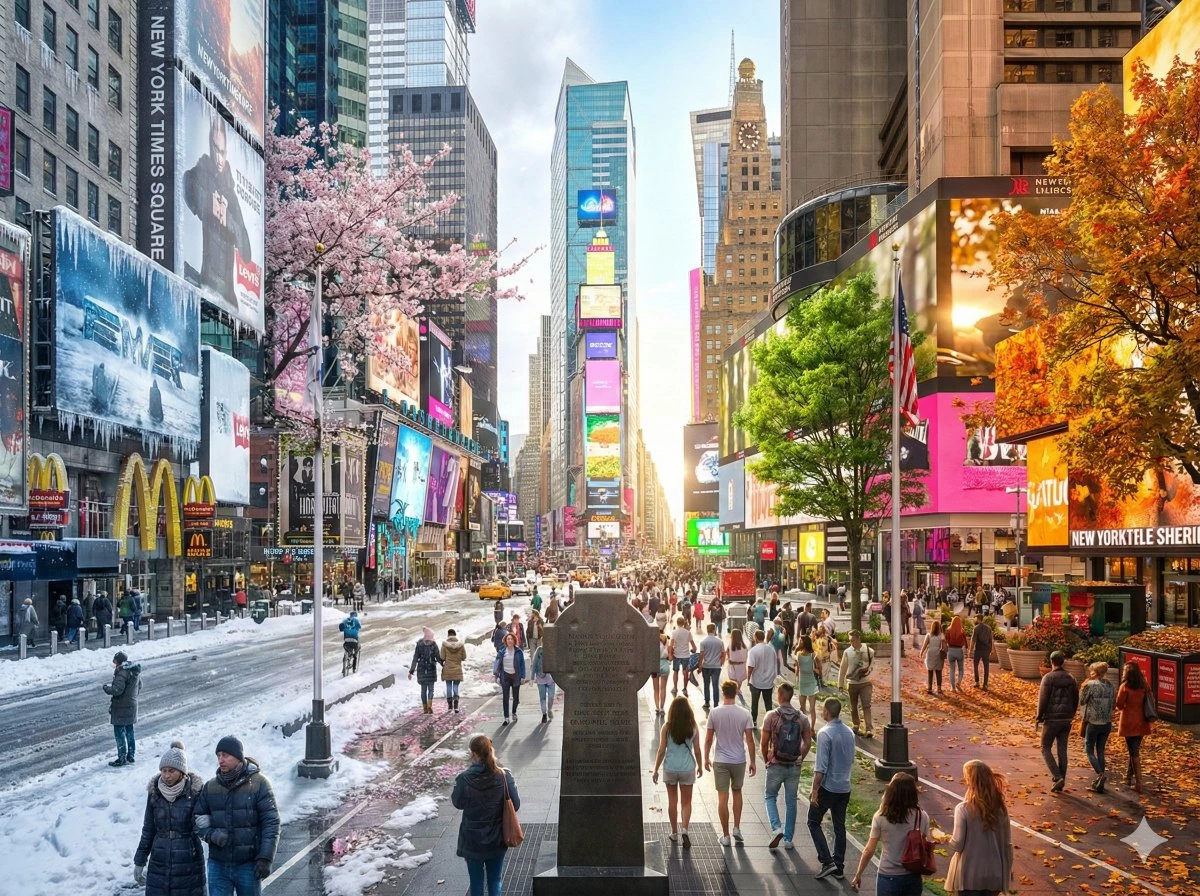
- "Times Square in New York City"
- "The historic Shanghai Bund waterfront"
- "A winding mountain path through forest"
- "A traditional Japanese temple garden"
Hyper-realistic digital illustration of {Your Scene}, presented as
a single continuous composition showcasing the cycle of seasons.
The scene flows seamlessly from left to right in a natural progression:
Winter, Spring, Summer, and Autumn.

The left side features cold snowy winter elements, gradually thawing
into the fresh green buds and blooms of spring, then morphing into
the lush vibrant vegetation and bright sunlight of summer, and finally
transitioning into the golden, orange, and red hues of autumn on the
far right.

There are no visible dividing lines between seasons; the weather,
lighting, and vegetation blend smoothly to create a unified and
harmonious panorama. Rich in detail, symbolic of the passage of time,
cinematic lighting, 8k resolution, highly detailed textures.
- Aspect Ratio: Recommended
4:3or16:9for panoramic effect - Resolution: Choose 2K or 4K for best detail
- Variations: Generate multiple versions to select the best transition flow
- 📥 Download: Save as high-resolution PNG/JPG
- 🔄 Refine: Adjust scene details and regenerate
- 🎨 Style Variations: Try different artistic approaches
- 📱 Share: Post to social media with seasonal themes
3. Four Seasons Transition Use Cases & Examples
3.1 Natural Landscapes
Hyper-realistic digital illustration of a mountain valley with a winding
river, presented as a single continuous composition showcasing the cycle
of seasons. The scene flows seamlessly from left to right in a natural
progression: Winter, Spring, Summer, and Autumn. Snow-covered peaks and
frozen river transition into melting ice and early wildflowers, then into
lush green valley with flowing river, finally becoming golden grasslands
with warm autumn light. 8k resolution, cinematic lighting, nature photography
style.
3.2 Urban & Landmarks
Hyper-realistic digital illustration of the historic Shanghai Bund
waterfront looking across the Huangpu River to the futuristic Lujiazui
district, presented as a single continuous composition showcasing the
cycle of seasons. The scene flows seamlessly from left to right:
winter fog and bare trees, spring flowering trees, summer haze and
bright skies, autumn golden light and falling leaves. The iconic
buildings remain constant while weather and vegetation transform.
Rich in detail, symbolic of Shanghai's timeless elegance through
seasons, cinematic lighting, 8k resolution.
3.3 Creative & Commercial
- Use horizontal orientation for desk calendars
- Add subtle month indicators if needed
- Keep central focus strong and clear
- Split composition: Tree splits into four distinct seasonal versions
- Circular flow: Seasons arranged in mandala pattern
- Time-lapse style: Same location, four seasonal moments
- 📈 Business cycles and growth
- 🔄 Transformation and adaptability
- ⏳ Longevity and sustained presence
- 🌱 Natural evolution
3.4 Personal & Social Media
- Unique and eye-catching
- Shows personality and creativity
- Works across platforms (Twitter, LinkedIn, Facebook)
- "The street where we first met"
- "Our family home through the seasons"
- "The park where our children play"
- High visual impact drives shares
- Story-telling quality encourages comments
- Unique style increases saves/bookmarks
- "A year in one moment ⏱️❄️🌸☀️🍁"
- "Time flows, beauty remains"
- "Seasons change, memories stay"
4. Four Seasons Transition Prompt Writing Guide
4.1 Essential Prompt Components
✅ "A majestic oak tree in an open meadow"
✅ "Central Park Bethesda Fountain"
✅ "A traditional farmhouse with stone walls"
"presented as a single continuous composition showcasing the cycle
of seasons, flowing seamlessly from left to right in a natural
progression: Winter, Spring, Summer, and Autumn"
snow-covered,frozen,bare branches,icy,cold blue tonesfrost,snowflakes,winter fog,grey skies
fresh green buds,cherry blossoms,flowering trees,soft pastelsmelting snow,early wildflowers,new growth,gentle rain
lush vibrant vegetation,full green foliage,bright sunlightclear blue sky,warm golden light,blooming flowers,vivid colors
golden, orange, and red hues,falling leaves,harvest toneswarm amber light,maple leaves,autumn foliage,rustic colors
"There are no visible dividing lines between seasons; the weather,
lighting, and vegetation blend smoothly to create a unified and
harmonious panorama"
- Technical:
8K resolution,highly detailed textures,photorealistic - Artistic:
cinematic lighting,dramatic atmosphere,rich in detail - Conceptual:
symbolic of the passage of time,harmonious panorama
4.2 Complete Prompt Template
Hyper-realistic digital illustration of {SCENE}, presented as a
single continuous composition showcasing the cycle of seasons.
The scene flows seamlessly from left to right in a natural
progression: Winter, Spring, Summer, and Autumn.

The left side features {WINTER DETAILS}, gradually thawing into
{SPRING DETAILS}, then morphing into {SUMMER DETAILS}, and finally
transitioning into {AUTUMN DETAILS} on the far right.

There are no visible dividing lines between seasons; the weather,
lighting, and vegetation blend smoothly to create a unified and
harmonious panorama. Rich in detail, symbolic of the passage of
time, cinematic lighting, 8k resolution, highly detailed textures.
4.3 Scene-Specific Examples
Scene: "A winding forest path through dense woodland"

Winter details: "snow-covered path, bare trees, frost on branches,
cold blue-grey atmosphere"

Spring details: "melting snow revealing brown path, budding trees,
scattered wildflowers, soft morning mist"

Summer details: "lush green canopy, dappled sunlight on path,
vibrant undergrowth, warm golden rays"

Autumn details: "carpet of fallen leaves, golden-red tree canopy,
warm amber light filtering through branches"
Scene: "A bustling city avenue with tall buildings and street trees"

Winter details: "snow on sidewalks, bare street trees, cold lighting,
people in winter coats, grey skies"

Spring details: "flowering street trees with pink blossoms, lighter
clothing, clearer skies, fresh green emerging"

Summer details: "full green tree canopy providing shade, bright
sunshine, vibrant street life, clear blue sky"

Autumn details: "golden-orange foliage on street trees, falling
leaves, warm evening light, cozy autumn atmosphere"
Scene: "The Eiffel Tower viewed from Trocadéro Gardens"

Winter details: "snow-dusted gardens, bare trees framing the tower,
soft grey sky, winter fog"

Spring details: "blooming garden flowers, fresh green lawns,
cherry blossoms, spring rain clearing"

Summer details: "lush gardens in full bloom, bright blue sky,
tourists enjoying sunny weather, vibrant atmosphere"

Autumn details: "golden trees surrounding the tower, fallen leaves
on paths, warm sunset glow, autumn colors"
4.4 Common Mistakes & Solutions
"A busy street with cars, shops, people, different buildings,
traffic lights, and trees"
"A tree-lined boulevard with historic buildings, view down the street"
"A tree in winter, spring, summer, and autumn"
"The scene flows seamlessly... blend smoothly to create a unified
and harmonious panorama"
"Winter with green leaves and summer with snow"
Winter: "bare branches, snow"
Summer: "full green foliage, bright sunshine"
Aspect ratio: 9:16 (portrait)
Recommended: 4:3, 16:9, or 21:9 (landscape/panoramic)
4.5 Advanced Techniques
"...with particular emphasis on the autumn transition, featuring
vibrant golden and crimson tones dominating the right third of
the composition"
"...with atmospheric effects including morning mist in spring,
brilliant sunshine in summer, and soft golden hour glow in autumn"
"...with subtle symbolic elements like a sundial or clock showing
time's passage through the seasonal cycle"
"The scene also transitions from dawn in winter through midday
in spring and summer to sunset in autumn, creating a double
transformation of time"
5. Four Seasons Transition Generator FAQs
"flows seamlessly from left to right"
"gradually thawing into... then morphing into... finally transitioning"
"no visible dividing lines between seasons"
"blend smoothly to create a unified and harmonious panorama"
- "divided into four sections"
- "split into seasons"
- "four separate seasons"
"The scene flows seamlessly from left to right in a reverse seasonal
progression: Autumn, Summer, Spring, and Winter. Starting with golden
autumn foliage, transitioning through lush summer greenery and spring
blossoms, finally ending with snowy winter on the right."
- 🏆 Best:
4:3(e.g., 2048×1536) - Classic panoramic, balanced - 🎬 Cinematic:
16:9(e.g., 3840×2160) - Wide, dramatic - 📱 Ultra-wide:
21:9(e.g., 3440×1440) - Maximum panoramic effect
"The scene flows seamlessly from top to bottom in a natural vertical
progression: Winter at the top, gradually transitioning through Spring
and Summer in the middle, to Autumn at the bottom..."
"...presented as a continuous composition transitioning from winter
to summer. The left side features cold snowy elements, gradually
warming and blooming into the lush vibrant vegetation and bright
sunlight of summer on the right..."
"...showcasing the transition from spring to autumn. Fresh pink
blossoms and new green growth on the left gradually mature into
the golden, orange, and red hues of autumn on the right..."
"...with a lone figure walking through the scene, their clothing
and posture adapting naturally to each season - winter coat,
spring jacket, summer t-shirt, autumn sweater"
"...showing seasonal activities: children building snowmen in winter,
flying kites in spring, playing in summer sun, jumping in autumn leaves"
Scene: "Main Street in [Town Name], with the historic [Landmark Name]
and surrounding [distinctive features like old brick buildings,
specific trees, etc.]"
- Region-specific trees (maple, oak, pine, palm)
- Local weather patterns (monsoon, fog, desert heat)
- Cultural elements (holiday decorations, local festivals)
"...with subtle seasonal transitions appropriate to the tropical climate:
wet season moisture and lush growth transitioning to dry season golden
light and less vegetation"
"...showing desert seasonal changes: cooler winter with occasional frost,
spring wildflower bloom, intense summer heat and bright light, mild
autumn with warm tones"
"Hyper-realistic digital illustration of {SCENE} arranged in a circular
mandala composition, with four seasons radiating from the center.
Winter at 12 o'clock, transitioning clockwise through Spring at 3 o'clock,
Summer at 6 o'clock, and Autumn at 9 o'clock. Seasons blend seamlessly
with no visible divisions, creating a harmonious circular representation
of the annual cycle. 8K resolution, symmetrical composition, rich detail."
"photorealistic style, natural lighting, true-to-life colors,
documentary photography aesthetic"
"fantasy art style, enhanced vibrant colors, magical lighting effects,
dreamlike atmosphere, surreal beauty, enchanted seasonal transformation"
"impressionist painting style, loose brushstrokes, artistic interpretation,
vibrant color palette, Claude Monet inspired"
6. Technical Tips for Best Results
6.1 Resolution & Quality Settings
- Resolution: Minimum 2K (2048×1536), optimal 4K for print
- File format: PNG for web, TIFF for print
- Color space: sRGB for digital, Adobe RGB for print
6.2 Post-Generation Enhancement
- Enhance transition smoothness: Use subtle gradient overlays if needed
- Color grading: Ensure lighting feels continuous across seasons
- Detail refinement: Sharpen key elements while maintaining blend
- Crop & compose: Find the perfect balance of all four seasons
6.3 Usage Rights & Applications
- ✅ Marketing materials, websites, social media
- ✅ Print products (posters, calendars, cards)
- ✅ Editorial use (magazines, blogs, publications)
- ✅ Corporate presentations and reports
7. Inspiration Gallery: Scene Ideas
- Ancient tree in open field
- Mountain range with lake reflection
- Winding forest trail
- Coastal cliff overlook
- Flower garden with fountain
- City park with skyline view
- Historic downtown street
- University campus quad
- Waterfront promenade
- Neighborhood tree-lined avenue
- Your city's iconic building or monument
- Famous bridges
- Historic temples or churches
- Public squares and plazas
- Cultural heritage sites
- Childhood home
- Wedding venue
- Favorite vacation spot
- Local park or nature area
- Meaningful street or intersection
- Same chair in different seasonal settings
- Window view through the year
- Garden gate perspective
- Tree swing through seasons
- Park bench with changing backdrop
8. Start Creating Your Seasonal Journey
- Choose a scene with natural elements (trees, vegetation, outdoor space)
- Copy our proven prompt template
- Replace {SCENE} with your chosen location
- Generate and watch the seasons blend seamlessly