
Landscape Design Generator: AI Tool for Professional Garden Visuals
Landscape Design Generator is an AI tool that creates visual representations of outdoor spaces from text descriptions. Whether you're planning a residential garden, commercial plaza, or park renovation, you describe the site characteristics, design elements, and aesthetic vision—and the AI generates a professional landscape design visualization.
1. What is a Landscape Design Generator?
A Landscape Design Generator is an AI tool that creates visual representations of outdoor spaces from text descriptions. Whether you're planning a residential garden, commercial plaza, or park renovation, you describe the site characteristics, design elements, and aesthetic vision—and the AI generates a professional landscape design visualization.
These AI-generated designs are conceptual illustrations, not construction blueprints. They serve purposes such as:
- Client presentations: Show landscape design proposals to homeowners or developers
- Planning and permitting: Provide visual context for municipal reviews (not engineering documents)
- Marketing materials: Create compelling images for landscape architecture portfolios or real estate listings
- Educational resources: Illustrate design principles, plant arrangements, and hardscape techniques
- DIY garden planning: Visualize backyard transformations before purchasing materials
The AI understands landscape design vocabulary—plant types, hardscape materials, grading concepts, water features, lighting, and spatial composition. It can generate plans in various formats: top-view site plans, isometric 3D diagrams, or rendered perspective views showing how the finished space will look.
Key distinction from professional landscape software: Tools like AutoCAD Civil 3D, Vectorworks Landmark, or SketchUp with rendering plugins offer precision grading plans, irrigation layouts, and construction specifications. AI generators produce visualization assets for communication and concept exploration, not engineering documents. They're ideal for the early design phase—testing ideas, getting client buy-in, and refining aesthetics before moving to technical drawings.
Who benefits:
- Landscape architects: Rapidly generate concept designs for client meetings
- Homeowners: Visualize garden renovations or new landscaping
- Real estate developers: Show site improvements for property marketing
- Garden designers: Explore plant palette and layout options
- Municipal planners: Illustrate park upgrades or streetscape improvements
- Educators: Create teaching materials for horticulture and design courses
2. How to Use the Landscape Design Generator
Effective landscape design prompts require describing both functional elements (paths, patios, planting beds) and aesthetic qualities (style, plant palette, atmosphere).
AI Model Selection
Choosing the right AI model depends on whether you need technical site plans or inspirational rendered views:
- SeeDream AI: Best for clean 2D landscape site plans and technical diagrams. SeeDream produces crisp, clear line drawings with well-defined zones, pathways, and planting beds. Ideal for client presentations, landscape architecture drawings, and professional site plan documentation. Use SeeDream when clarity and technical precision are priorities.
- Nano Banana Pro (gemini-3-pro-image-preview): The premier choice for photorealistic 3D landscape renderings. Nano Banana Pro excels at generating lush, detailed perspective views with realistic plant textures, natural lighting, seasonal colors, and atmospheric effects. Perfect for marketing materials, client inspiration boards, and emotive visualizations that sell the design vision.
- Dreamina: Ideal for artistic and conceptual landscape designs. Use Dreamina for imaginative, mood-driven garden concepts, avant-garde landscape art, or exploring unconventional planting schemes and spatial arrangements. Best when creative expression outweighs technical accuracy.
Basic Workflow
- Define the site and scale
- "Residential backyard, 30x40 feet, rectangular"
- "Front yard of a suburban home, 20x30 feet, gentle slope"
- "Urban park, 1 acre, open field with perimeter trees"
- List functional zones and hardscape
- "Patio area near house (12x16 ft flagstone), winding gravel path, raised planting beds"
- "Deck with built-in seating, fire pit area, lawn space for play"
- "Entrance walkway, driveway parking, flower beds along fence"
- Describe planting and vegetation
- "Mixed perennial borders, ornamental grasses, deciduous shade trees"
- "Native plant garden: coneflowers, black-eyed Susans, switchgrass"
- "Mediterranean style: lavender, rosemary, olive trees, gravel mulch"
- Specify design style and view type
- "Modern minimalist, geometric beds, limited color palette"
- "English cottage garden, abundant flowers, informal layout"
- "Top-view site plan, 2D, labeled zones" OR "Rendered 3D perspective view from patio"
Example Prompt Progression
Basic prompt:
"Backyard landscape design with patio, lawn, and flower beds."
Improved prompt:
"Landscape design for a 30x40 ft rectangular backyard. Flagstone patio (12x14 ft) adjacent to house, meandering stone path leading to lawn area (20x20 ft), perennial flower beds along side fences, small shade tree in corner. Top-view site plan, simple 2D drawing, labeled zones."
Advanced prompt:
"Professional landscape design for a suburban backyard, 35x45 ft. Site slopes gently down from house. Hardscape: composite deck (14x18 ft) with pergola and built-in bench seating, natural stone steps descending to main lawn (22x30 ft), flagstone path leading to fire pit area (10 ft diameter) with Adirondack chairs, raised cedar planting beds (4x8 ft each) flanking deck. Planting: mixed shrub border along perimeter (hydrangeas, boxwood, ornamental grasses), shade tree (red maple) in northwest corner, sun-loving perennials (daylilies, coneflowers, salvia) in raised beds, groundcover (creeping thyme) between flagstones. Style: transitional cottage-modern blend, soft color palette (whites, blues, purples), natural materials. View: 3D rendered perspective from deck looking toward fire pit, late afternoon lighting, lush and inviting."
Refinement Tips
- Iterate on layout: If the patio feels disconnected from the garden, revise spatial relationships ("patio flows directly into lawn area")
- Adjust plant density: If the design looks sparse, request "fuller planting, layered borders, more visual interest"
- Clarify elevation changes: For sloped sites, specify grading ("gentle terracing with stone retaining walls," "gradual slope, no walls")
- Refine view angle: Top-view plans show layout logic; perspective views show emotional impact. Choose based on your communication goal.
3. Use Cases for the Landscape Design Generator
Residential Garden Planning
Scenario: A homeowner wants to replace their lawn with a low-maintenance native plant garden. They generate several design options to compare before hiring a landscaper.
Application:
- DIY planning: Visualize the transformation before purchasing plants
- Contractor communication: Show landscapers exactly what you want
- Budget estimation: Use the visual to get accurate quotes from multiple vendors
- Seasonal planning: Generate views showing different seasonal interest (spring blooms, fall color)
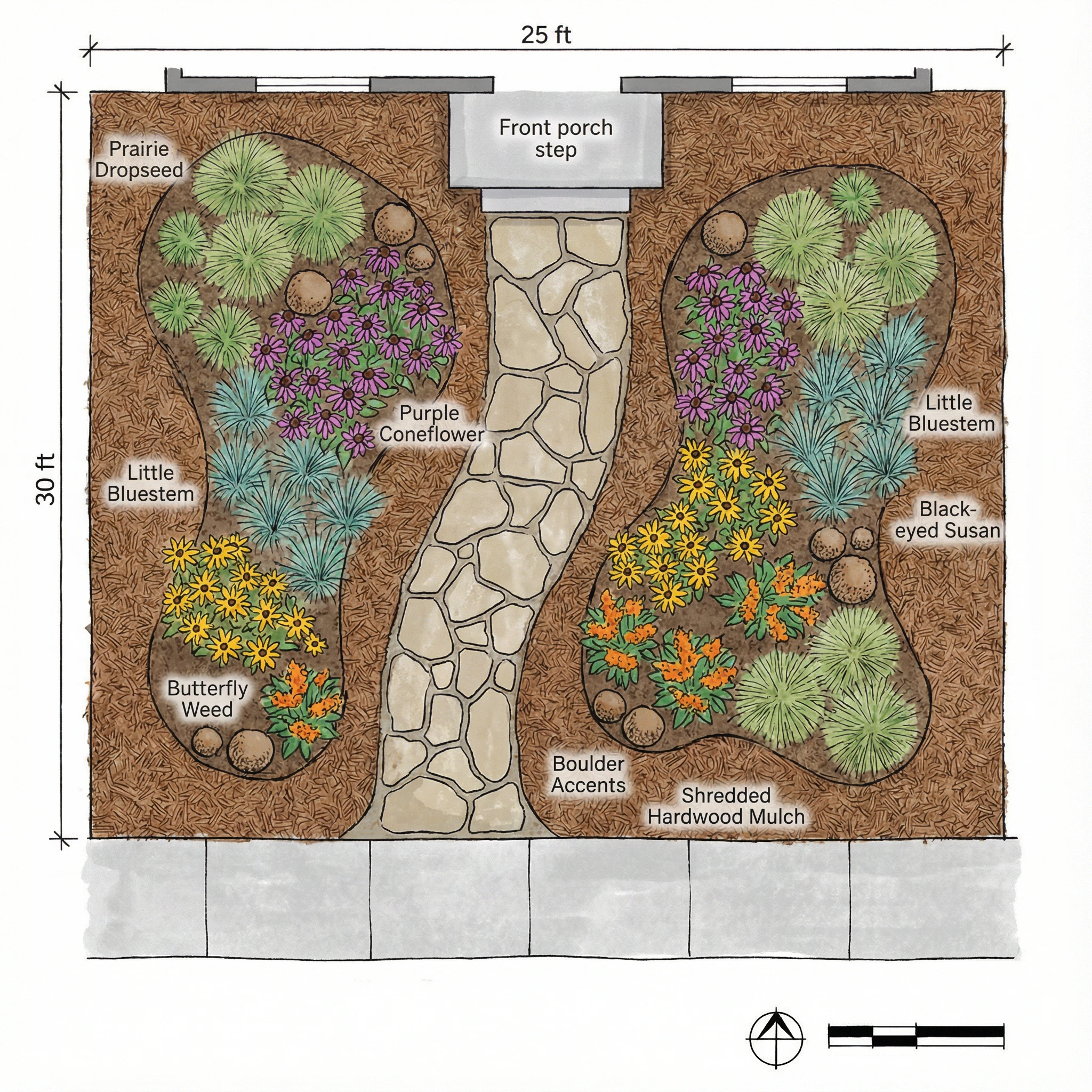
Example: "Front yard landscape design, 25x30 ft, replacing lawn with native prairie garden. Curved stone path from sidewalk to front door, planting beds on both sides with prairie dropseed, little bluestem, purple coneflower, black-eyed Susan, butterfly weed. Boulder accents. Mulched with shredded hardwood. Top-view site plan, labeled plant groups."
Landscape Architecture Client Presentations
Scenario: A landscape architect pitches three design concepts for a residential backyard. AI-generated visuals allow the client to quickly grasp each option's spatial flow and aesthetic before the architect invests hours in detailed CAD work.
Application:
- Concept exploration: Show 3-5 layout alternatives in the first meeting
- Design narrative: Illustrate how the design responds to site conditions (views, sun exposure, privacy)
- Budget discussions: Compare simple vs. elaborate options visually
- Stakeholder alignment: Get family members to agree on a direction
Example: "Option A: Formal symmetrical garden with central fountain, boxwood hedges, rose beds. Option B: Naturalistic woodland garden with meandering paths, shade-tolerant perennials, water feature with boulders. Option C: Modern minimalist with geometric concrete pavers, ornamental grasses, minimal color. All 3D rendered perspective views from house."
Real Estate & Property Development
Scenario: A developer markets new homes by showing potential buyers what the finished landscaping will look like. AI-generated images depict mature gardens, enhancing property appeal.
Application:
- Marketing brochures: Show landscaped yards, not bare dirt
- Website listings: Enhance property photos with landscape renderings
- HOA planning: Illustrate community park upgrades or common area improvements
- Before/after comparisons: Show renovation impact on property value
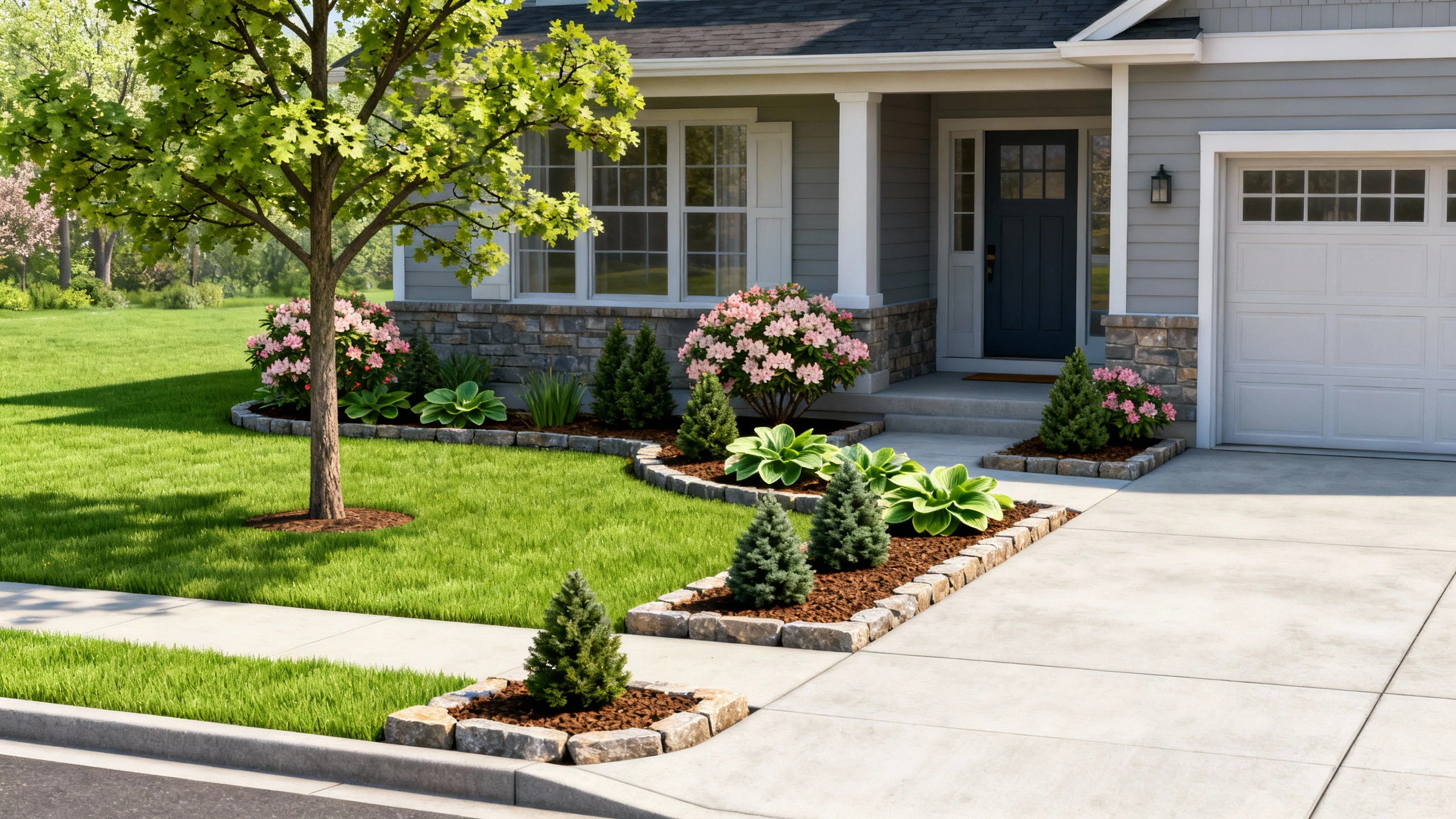
Example: "Landscape rendering for new construction home, front yard. Sod lawn, foundation plantings (azaleas, hostas, dwarf conifers), young shade tree (oak), stone-edged planting beds, mulch, concrete driveway and walkway. Realistic 3D perspective view from street, spring season, welcoming curb appeal."
Public Space & Park Design
Scenario: A municipal parks department proposes a playground upgrade. They generate visuals showing new pathways, seating areas, and plantings to present at a community meeting.
Application:
- Public engagement: Help residents visualize proposed changes
- Grant applications: Include compelling images in funding proposals
- Permitting: Provide illustrative context for planning commissions
- Phased implementation: Show short-term vs. long-term build-out scenarios
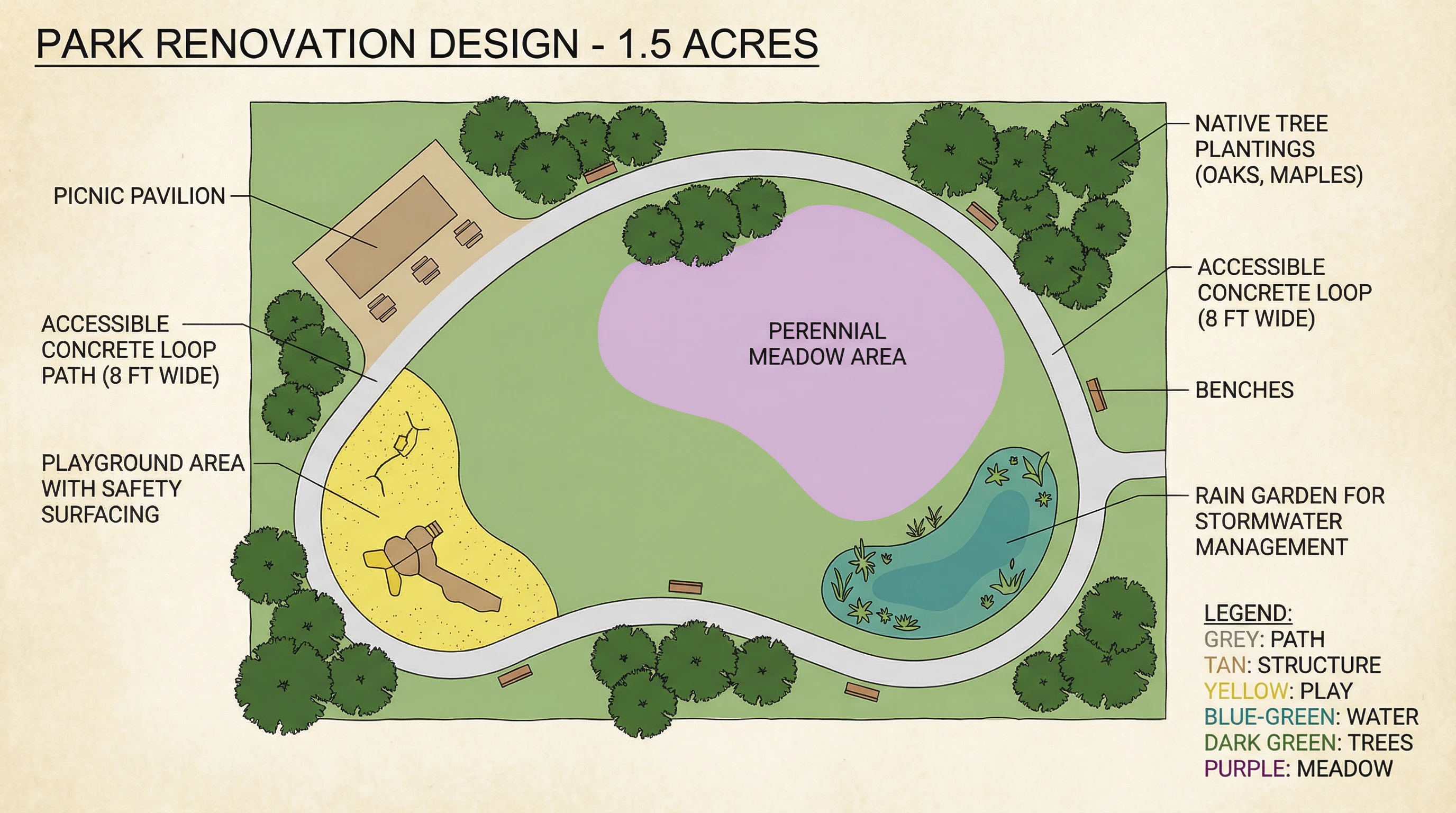
Example: "Park renovation design, 1.5 acres. New features: accessible concrete loop path (8 ft wide), picnic pavilion, playground area with safety surfacing, rain garden for stormwater management, native tree plantings (oaks, maples), perennial meadow area, benches along path. Top-view site plan with color-coded zones and labels."
Educational & Training Materials
Scenario: A horticulture instructor creates a series of landscape design examples to teach students about plant layering, color theory, and hardscape integration.
Application:
- Textbook illustrations: Show well-designed vs. poorly designed gardens
- Online courses: Provide visual examples of design principles
- Workshops: Generate case studies for group critique sessions
- Plant palette guides: Illustrate how specific plants look in designed settings
Example: "Generate three garden designs with identical layouts but different planting palettes: 1) Cool colors (blues, purples, whites), 2) Warm colors (reds, oranges, yellows), 3) Monochromatic (all white flowers with green foliage). Show impact of color theory on garden mood."
Event & Hospitality Spaces
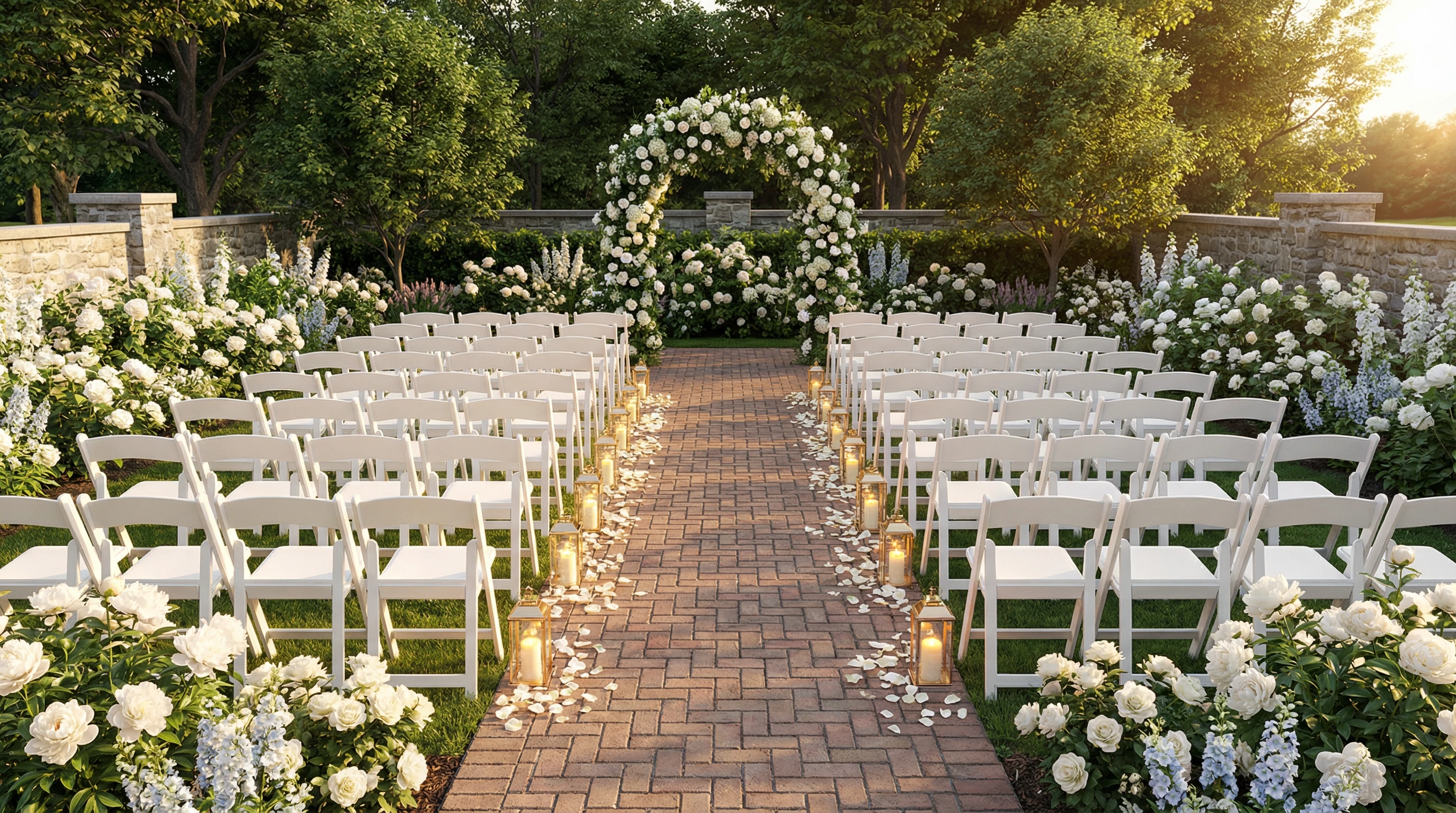
Scenario: A wedding venue wants to upgrade their garden ceremony area. They generate design options showing different seating arrangements, floral installations, and lighting concepts.
Application:
- Venue marketing: Show event spaces in their best light
- Client customization: Generate renderings for specific events ("How would our wedding look here?")
- Seasonal adaptations: Visualize summer garden parties vs. winter holiday events
- Lighting design: Show daytime vs. evening ambiance with string lights, uplighting, lanterns
Example: "Outdoor wedding ceremony space, 30x40 ft garden area. White folding chairs in rows (8 per row, 10 rows), floral arch at altar position (roses, hydrangeas, greenery), aisle lined with lanterns, perennial borders (white flowers: peonies, roses, delphiniums), brick paver floor. Rendered 3D view from back row, soft romantic lighting, late afternoon sun."
4. Prompt Guide for Landscape Design Generation
Essential Components of a Strong Prompt
- Site dimensions and shape
- Hardscape elements (paths, patios, walls, structures)
- Planting zones (beds, borders, lawns, trees)
- Plant types and style (formal, cottage, native, modern)
- View type (top-view plan, 3D perspective, isometric)
- Atmosphere and lighting (time of day, season, mood)
Vocabulary for Landscape Description
Hardscape materials:
- "Flagstone patio"
- "Brick paver walkway"
- "Decomposed granite path"
- "Concrete pavers in grass (stepping stones)"
- "Dry-stacked stone wall"
- "Cedar deck with built-in benches"
- "Pergola with climbing vines"
- "Gravel driveway"
Planting types:
- "Mixed perennial border" (flowering plants that return each year)
- "Shrub foundation planting" (evergreen shrubs around house base)
- "Ornamental grasses" (low-maintenance texture plants)
- "Deciduous shade trees" (trees that lose leaves in winter)
- "Evergreen screening" (year-round privacy plants)
- "Groundcover" (low plants that spread to cover soil)
- "Herb garden" (culinary plants in raised beds)
- "Native prairie planting" (regional wildflowers and grasses)
Design styles:
- Formal: Symmetrical, geometric beds, clipped hedges, limited plant palette
- Cottage garden: Abundant flowers, informal mixed plantings, romantic feel
- Modern/minimalist: Clean lines, limited materials, architectural plants, negative space
- Native/naturalistic: Regional plants, organic shapes, ecological function
- Mediterranean: Drought-tolerant, gravel mulch, herbs, terracotta accents
- Japanese-inspired: Zen simplicity, evergreens, rocks, water features, borrowed scenery
- Tropical: Bold foliage, bright colors, lush layering, exotic plants
View types:
- Top-view site plan (2D bird's-eye view showing layout)
- Isometric 3D (angled overhead view with depth)
- Perspective rendering (realistic view from a specific vantage point)
- Elevation view (side view showing vertical layers)
Sample Prompts by Scenario
Residential Front Yard - Curb Appeal Upgrade
"Front yard landscape design for a suburban home, 30x35 ft. Curved concrete walkway from sidewalk to front door, flanked by planting beds (5 ft wide). Foundation plantings: evergreen shrubs (boxwood, dwarf Alberta spruce) near house, mixed perennials (hostas, daylilies, salvia) in front layer, ornamental grasses as accents. Young shade tree (Japanese maple) in front corner of yard, sod lawn in center area. Mulched beds with stone edging. Style: traditional, welcoming, clean. Top-view site plan, color-coded zones, labeled plant groups."
Residential Backyard - Outdoor Living Space
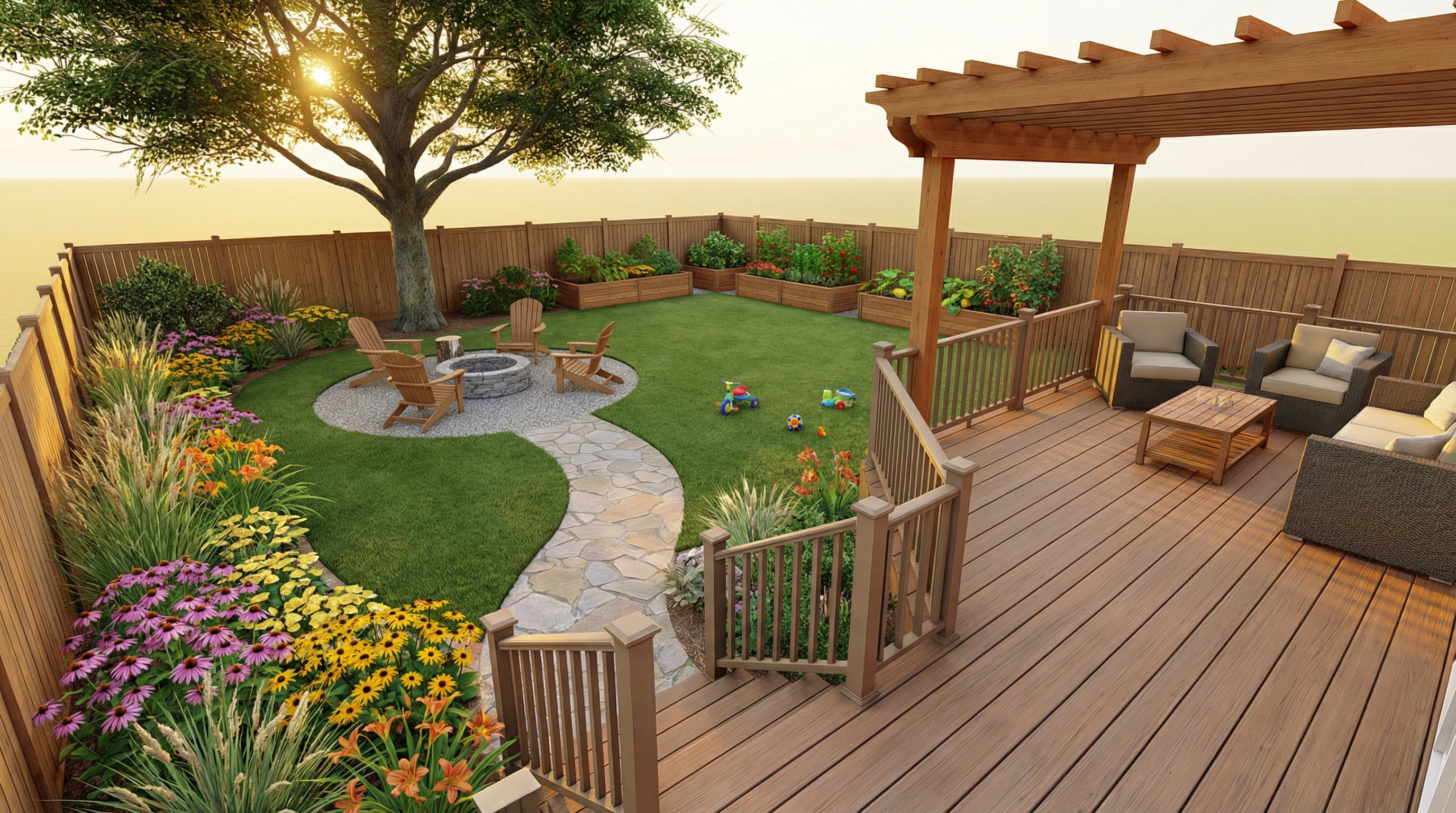
"Backyard landscape design, 40x50 ft, for family with young children. Composite deck (16x20 ft) with pergola, stairs down to main lawn (25x35 ft open play area), flagstone path leading to fire pit area (12 ft diameter, Adirondack chairs on gravel surface). Perennial borders along side fences (coneflowers, black-eyed Susans, daylilies, ornamental grasses), shade tree in corner. Raised cedar planting beds (vegetable garden) along back fence. Style: casual, functional, low-maintenance. 3D rendered perspective from deck, late afternoon sun, inviting and spacious feel."
Commercial Property - Office Courtyard
"Landscape design for corporate office courtyard, 50x60 ft. Central seating area with bench clusters (wood and metal modern style), decomposed granite paths (6 ft wide) in geometric pattern connecting entries. Planting beds with ornamental grasses (Karl Foerster feather reed grass, 'Heavy Metal' switchgrass) and evergreen shrubs (boxwood spheres). Four shade trees (Zelkova) at corners. Minimalist aesthetic, professional, easy maintenance. Top-view site plan, rendered with materials and shadows, clean corporate look."
Public Park - Community Garden
"Landscape design for community garden park, 0.5 acres (100x200 ft). Features: 12 raised garden beds (4x8 ft each, cedar construction) in grid layout, central gathering area with picnic tables and shade structure, accessible gravel paths (5 ft wide), perimeter native plantings (wildflower meadow mix), tool shed (10x12 ft), compost bins, rain barrels. Entrance arbor with signage. Style: welcoming, functional, sustainable. Top-view site plan, color-coded zones (garden beds green, paths tan, gathering space gray), labeled features."
Residential Side Yard - Narrow Space Solution
"Landscape design for narrow side yard, 8x40 ft. Challenges: shaded by house and fence, only 8 ft wide. Design: meandering stepping stone path (2 ft wide flagstones in mulch), shade-tolerant planting beds on both sides (hostas, ferns, astilbe, heuchera, Japanese forest grass). Small water feature (bubbling urn) midway. Fence painted dark gray as backdrop. Style: woodland garden, lush, shaded oasis. Perspective rendering from entrance looking down path, dappled shade, tranquil mood."
Residential Front Yard - Drought-Tolerant Xeriscape
"Drought-tolerant front yard landscape, 35x40 ft, Mediterranean style. Remove lawn, replace with decomposed granite surface and flagstone stepping stones to entry. Planting beds with drought-tolerant perennials: lavender, Russian sage, salvia, yarrow, ornamental grasses (blue fescue, Mexican feather grass). Accent boulders. Young drought-tolerant tree (desert willow). Drip irrigation (not visible in rendering). Style: low-water, modern desert, sustainable. Top-view site plan with plant labels and material callouts."
Rooftop Garden - Urban Green Space
"Rooftop garden design, 20x30 ft. Lightweight growing system: raised planters (18" deep, composite material), modular deck tiles. Planting: ornamental grasses, drought-tolerant perennials (sedum, sempervivum), small shrubs (dwarf conifers). Seating area with weather-resistant furniture, privacy screen plantings (tall grasses in long planters). Wind-tolerant selections. Style: urban, modern, low-maintenance. 3D rendered perspective showing city skyline in background, sunny afternoon, rooftop oasis feel."
Common Mistakes to Avoid
Mistake: "Garden with flowers."
Problem: Too vague—AI doesn't know size, style, or specific plants.
Fix: "30x20 ft cottage garden with mixed perennial borders: roses, delphiniums, foxgloves, lavender. Informal layout, abundant blooms, gravel paths."
Mistake: "Modern landscape."
Problem: "Modern" is interpreted many ways—specify visual characteristics.
Fix: "Modern minimalist landscape: geometric concrete pavers, limited plant palette (ornamental grasses, sculptural agave), gravel mulch, clean lines, neutral colors."
Mistake: "Show plants and hardscape."
Problem: No spatial organization—how do elements relate?
Fix: "Flagstone patio adjacent to house, stone path leading through perennial borders to lawn area, shade tree at far end. Hardscape connects indoor to outdoor."
Mistake: Requesting specific plant cultivars without style context.
Problem: AI may not recognize niche cultivar names.
Fix: Use general terms with style descriptors: "Ornamental grasses (tall, feathery plumes, blonde fall color)" instead of "Calamagrostis x acutiflora 'Karl Foerster'."
5. Landscape Design Generator FAQs
Q1: Can I use AI-generated landscape designs for construction?
No. AI landscape designs are conceptual visualizations, not construction documents. They lack:
- Grading and drainage plans
- Irrigation system layouts
- Material specifications and quantities
- Construction details (paving installation, wall construction)
- Plant schedules with quantities, sizes, and spacing
- Professional landscape architect seal
For actual installation, use the AI visual as a concept reference, then hire a landscape architect or designer to create proper construction documents. Many professionals will work from your AI inspiration to develop buildable plans.
Q2: How realistic are the plants shown in AI-generated designs?
AI plant representations are stylistically accurate but botanically approximate. The AI understands visual characteristics (size, shape, texture, color) but may not perfectly match specific cultivars. Plants will look:
- Visually appropriate for the described style
- Correctly sized relative to hardscape
- In believable arrangements
But they won't necessarily be identifiable to species level. For plant selection, consult a horticulturist or use the AI design as a layout template, then choose specific plants suited to your climate and site conditions.
Q3: Can I generate designs for specific climates or regions?
Yes, by specifying regional plant palettes and climate-appropriate design:
- Desert Southwest: "Xeriscape design, Sonoran Desert plants: saguaro, palo verde, brittlebush, desert marigold, decomposed granite"
- Pacific Northwest: "Shade garden, Northwest natives: sword fern, vine maple, salal, Oregon grape, mulched beds"
- Southeastern US: "Southern garden: crape myrtles, azaleas, camellias, monkey grass, pine straw mulch"
However, always verify plant hardiness zones and water requirements with local experts before purchasing plants.
Q4: How do I show seasonal changes in the landscape?
Generate separate images for different seasons:
- "Spring view: flowering bulbs (tulips, daffodils), cherry tree in bloom"
- "Summer view: lush perennial borders, full foliage, vibrant greens"
- "Fall view: ornamental grasses golden, deciduous trees in autumn color"
- "Winter view: evergreen structure, ornamental grasses standing, dormant perennials"
This helps clients understand year-round interest and plan for continuous beauty.
Q5: Can I create landscape lighting plans with AI?
Yes, but lighting should be specified in your prompt:
- Functional lighting: "Path lights along walkway (low bollards every 8 ft), step lights on deck stairs"
- Accent lighting: "Uplights on tree trunks, spotlights on architectural plants"
- Ambient lighting: "String lights on pergola, lanterns on tables, fire pit glow"
- Time of day: "Evening view, landscape lit with warm LED lights, twilight sky"
For technical lighting plans (wiring, fixture specs), consult an outdoor lighting specialist.
Q6: How do I incorporate existing features into a new design?
Specify what stays and what's new:
"Backyard landscape redesign. Existing features to keep: mature oak tree in northwest corner, brick patio (10x12 ft) near house, wood fence around perimeter. New features: remove lawn and replace with native plant beds, add stone path from patio to oak tree, install bench under oak, plant shrub border along fence."
This helps the AI integrate old and new elements cohesively.
Q7: Can I generate edible garden and vegetable garden designs?
Absolutely. Specify the functional layout:
- "Raised bed vegetable garden, 20x30 ft area. Six cedar raised beds (4x8 ft each, 18" tall) in two rows, gravel paths (3 ft wide) between beds. Trellis for vertical crops (tomatoes, cucumbers) at north end. Herb garden (4x4 ft bed) near entrance. Compost bin at corner. Style: functional, organized, productive."
AI can also visualize edible landscaping integrated into ornamental gardens: fruit trees, berry bushes, edible flowers mixed with perennials.
Q8: How do I visualize steep slopes and terracing?
Describe the elevation change and how you'll manage it:
- "Sloped backyard (15 ft elevation change), three terraced levels connected by stone steps. Upper level: deck, middle level: lawn, lower level: fire pit area. Retaining walls (natural stacked stone, 3-4 ft tall) support terraces."
- "Hillside garden, gentle slope, no retaining walls. Groundcover plants (creeping juniper, creeping phlox) for erosion control, meandering stone path switchback style, boulders as natural anchors."
For engineering accuracy (wall stability, drainage), consult a professional.
Q9: What's the best view type for different purposes?
- Client presentations (residential): 3D rendered perspective from a key viewpoint (from house looking out, from street looking in)—emotionally engaging
- Contractor communication: Top-view site plan with labels and dimensions—shows layout logic
- Design exploration: Isometric 3D—good balance of spatial understanding and visual appeal
- Marketing brochures: Rendered 3D perspective with realistic lighting—aspirational and attractive
Generate multiple views for comprehensive communication.
Q10: How can I estimate costs from an AI landscape design?
AI visuals don't include material quantities or pricing, but you can use them to get contractor estimates:
- Generate the design visual
- List the elements shown (patio size and material, linear feet of path, number of trees/shrubs)
- Request quotes from landscape contractors, showing them the AI image as a reference
- Contractors will provide itemized estimates for materials, labor, and installation
The AI design communicates intent; contractors translate it into buildable reality with costs.
Conclusion
The Landscape Design Generator empowers homeowners, designers, developers, and planners to visualize outdoor spaces with professional polish and creative freedom. From residential gardens to public parks, this AI tool transforms site descriptions into compelling visual narratives—showing not just what the space is, but what it could become. While AI-generated designs don't replace the technical expertise of licensed landscape architects or the botanical knowledge of horticulturists, they excel at the critical early phase: conceptualizing ideas, exploring alternatives, and communicating vision to clients and stakeholders. By mastering the vocabulary of hardscape, planting design, and spatial composition, you can generate designs that inspire action—whether that's hiring a professional to build your dream garden, securing funding for a park renovation, or simply understanding how a few thoughtful changes can transform your outdoor living space. Start generating your landscape visions today and bring the beauty of the outdoors to life, one design at a time.